Zenni UX Working Docs: Make the thinking as visible as the design.
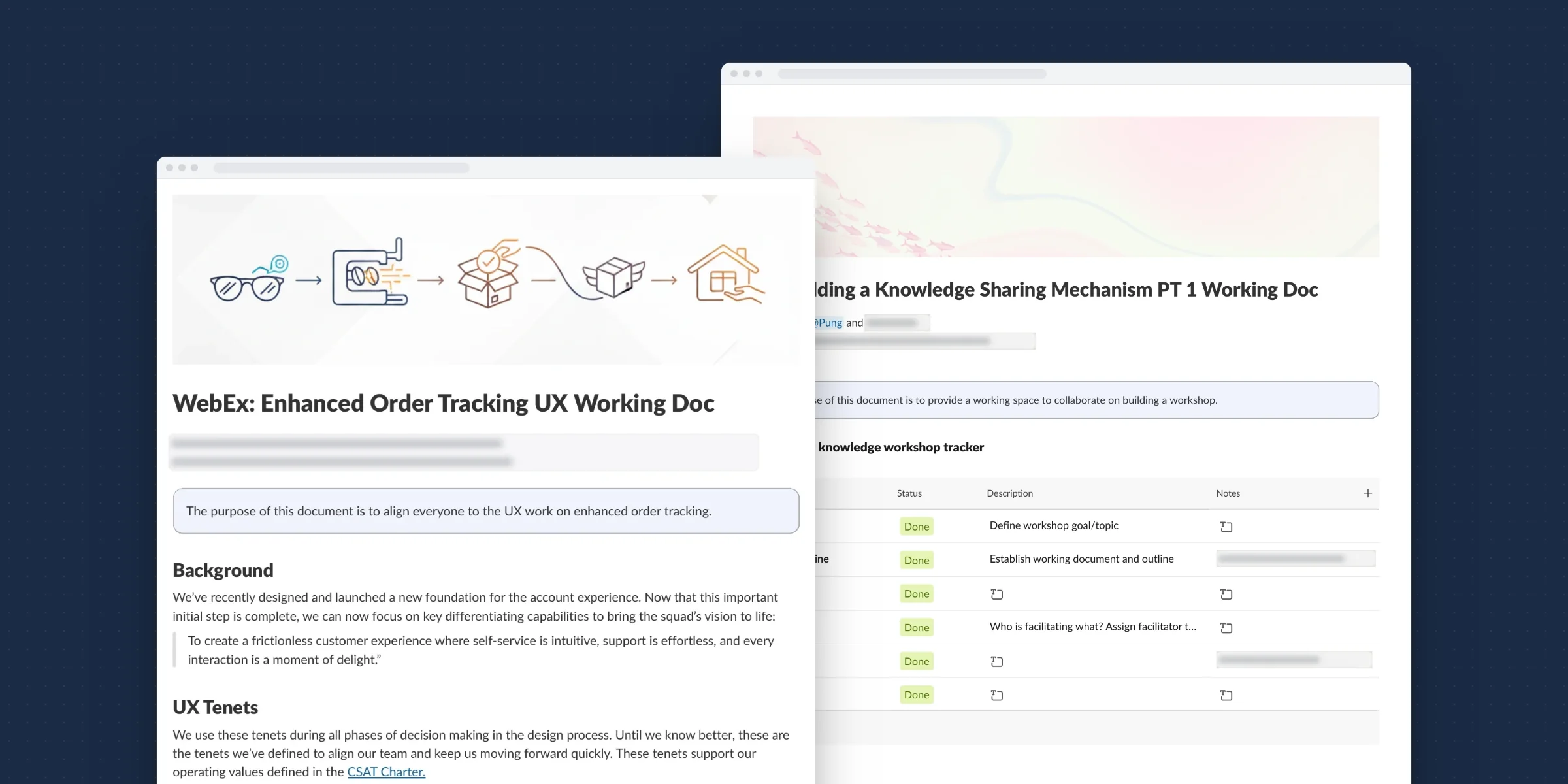
At Zenni, design mostly lived in Figma, and the reasoning behind it mostly lived in meetings. I proposed a lightweight way to work in the open: UX working docs in Slack canvases, built from a template I made. It started on my own projects, and grew into how the whole UX team tracked its work.
- The problem
- Figma showed what we designed, not why. Decisions were often made on the surface, the work of understanding a problem was often skipped, and unless you were in the meeting, you likely had no visibility into a tradeoff or a decision. The team had no place to manage its own work, and our UX manager had no bird’s-eye view of it.
- My role
- I saw the gap and spearheaded the fix. I proposed the workflow, created the canvas template, and proved it on my own projects. When the team reorganized, I piloted it with my team, Web Experience, and with my manager’s help rolled it out to the rest of UX.
- What I did
- A lightweight workflow that lived in Slack, the tool everyone was already in: a working doc for each project, where the purpose, the decisions and their tradeoffs were written down and open to threaded comments, and team trackers on top of them that gave everyone visibility into the work.
01 / Impact
A habit on my projects became how the team worked.
3of 3
UX teams adopted it
Growth, Web Experience and Design System all tracked their work in Slack.
Organizational outcome
1month
pilot with my team before rollout
We started slow on my own projects, then piloted it with Web Experience before rolling it out to the greater team.
Organizational outcome
Replaced
the Monday top-priorities message
A weekly automated prompt to type what you were working on, with no links or context, gave way to live trackers anyone could open.
Organizational outcome
Open by default
decisions visible outside the meeting
Partners commented directly on the docs, and the threads kept those conversations where everyone could see them.
Capability
02 / Key decisions
The fix was a habit, not a tool.
Put the work where people already are
The docs lived in Slack, so nobody had to adopt a new tool. Comments were threaded on the doc itself, so questions got answered and closed where everyone could see them. 4.1 ↓
Make understanding part of the template
The template asked for the purpose, the background and the tenets before the solution, so the understanding part of a problem had a place to live. 4.2 ↓
Designers didn’t want more work and our UX PM worried about Jira. I showed it on my own projects, piloted it with my team for a month, then rolled it out. 4.3 ↓
Build team trackers on top of the docs
Trackers gathered every project’s doc in one view, so our manager finally had a bird’s-eye view, and the weekly status message became unnecessary. 4.4 ↓
03 / Understanding the problem
Design lived in Figma. The thinking lived in meetings.
3.1 People
If you weren’t in the meeting, you didn’t see the decision.
Designers, product managers, engineers and business partners all depended on design decisions, but only the people in the room saw how they were made. Everyone else saw the result in Figma, without the tradeoffs that led to it, and couldn’t weigh in until the decision was already made.
3.2 System
Figma holds the what. Nothing held the why.
Figma was where design happened, and it was good at showing screens. It wasn’t built to hold the problem a screen was solving, the options we considered, or why we picked one. There was no existing mechanism to track decisions or collaborate on them. Slack, meanwhile, was where everyone already worked.
3.3 Gaps
Decisions were made on the surface.
Without a place to write down the understanding, it was easy to skip it and go straight to the screens. The quality of decisions suffered, and so did visibility.
04 / Making it work
A lightweight template in the tool we already used.
4.1 Put the work where people already are
No new tool, no new habit to learn first.
I proposed a lightweight UX working documentation workflow that lived in Slack. A canvas sits next to the conversations a team is already having, so it can be shared with a link and found later. Partners didn’t need a Figma seat or a meeting invite to follow along.
An added benefit was the threaded conversations. Partners commented directly on a tenet, a tradeoff or a decision, and the loop was closed right there in Slack, in a thread everyone could see.
I made a habit of keeping it that way. When feedback came in somewhere else, I added it to the doc as a comment, so the conversation lived with the decision. Then I posted the doc in our squad channel so everyone could see the change and weigh in. The canvas linked back to the related channels, so it was easy to move between the doc and the conversations around it.
I led my own projects this way first. On Zenni Account, the canvases became where the decisions happened, and where anyone could see what was decided and why before it was final.
4.2 Make understanding part of the template
The template asked for the thinking before the screens.
I turned those canvases into a template the team could adopt. The idea was to give just enough structure to show the tradeoffs and decisions, and no more. The Order Tracking working doc shows the shape:
- Who and where. The UX designer, content designer, product managers and TPM, with links to the Figma handoff and the team’s Slack channel.
- Purpose and background. One line on what the doc is for, and how the work connects to the squad’s vision.
- Tenets. The principles we used in every decision, “until we know better”, such as “Deliver confidence instantly” and “No dead ends, always provide value”.
- Metrics. The squad’s north star, and the goal for this initiative.
- The work. A project tracker, the messaging framework, an iteration tracker with a dated, recorded walkthrough for each iteration, user testing, and MVP scope and tradeoffs.
Putting the purpose, background and tenets first made the understanding part of a problem hard to skip.
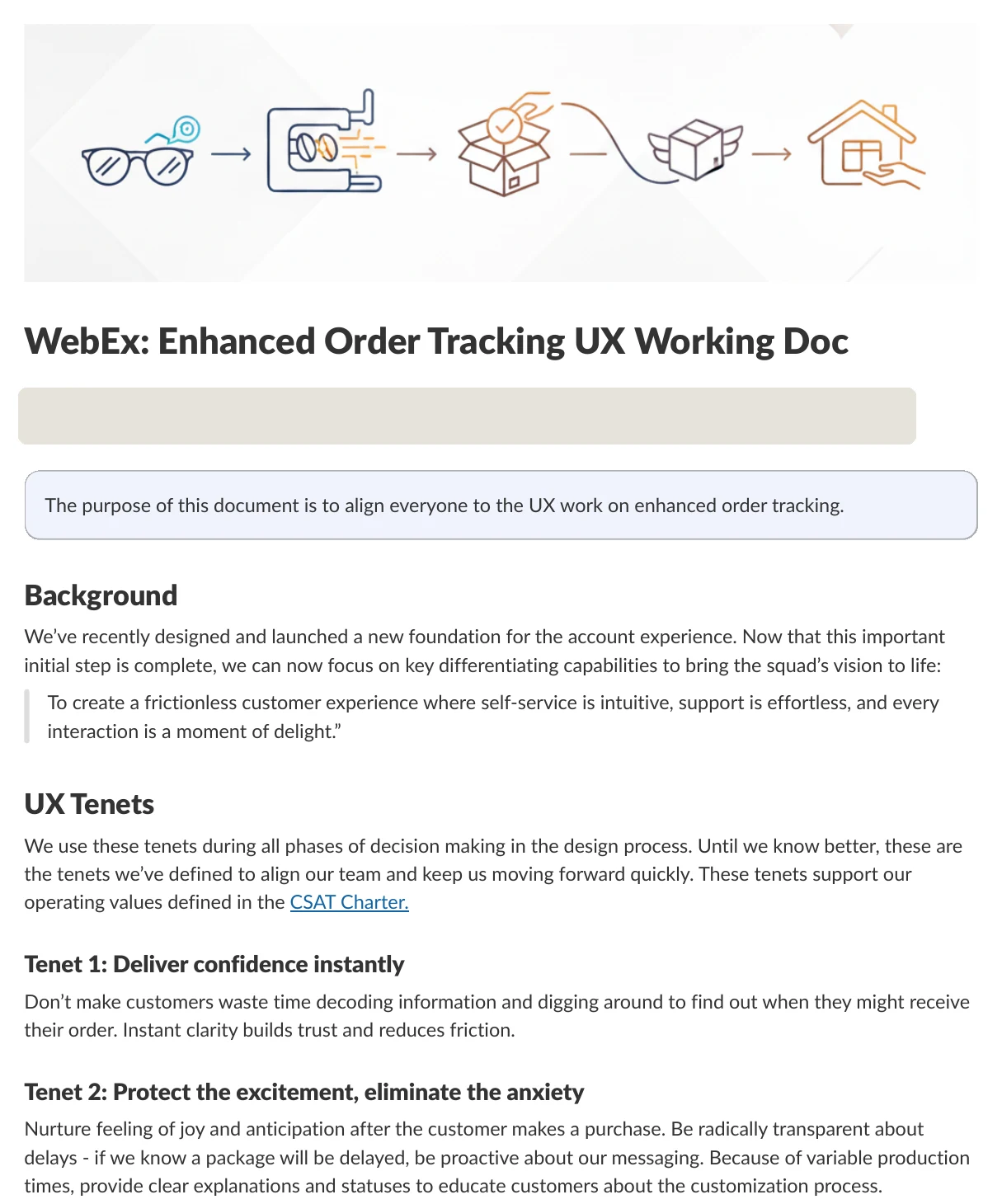
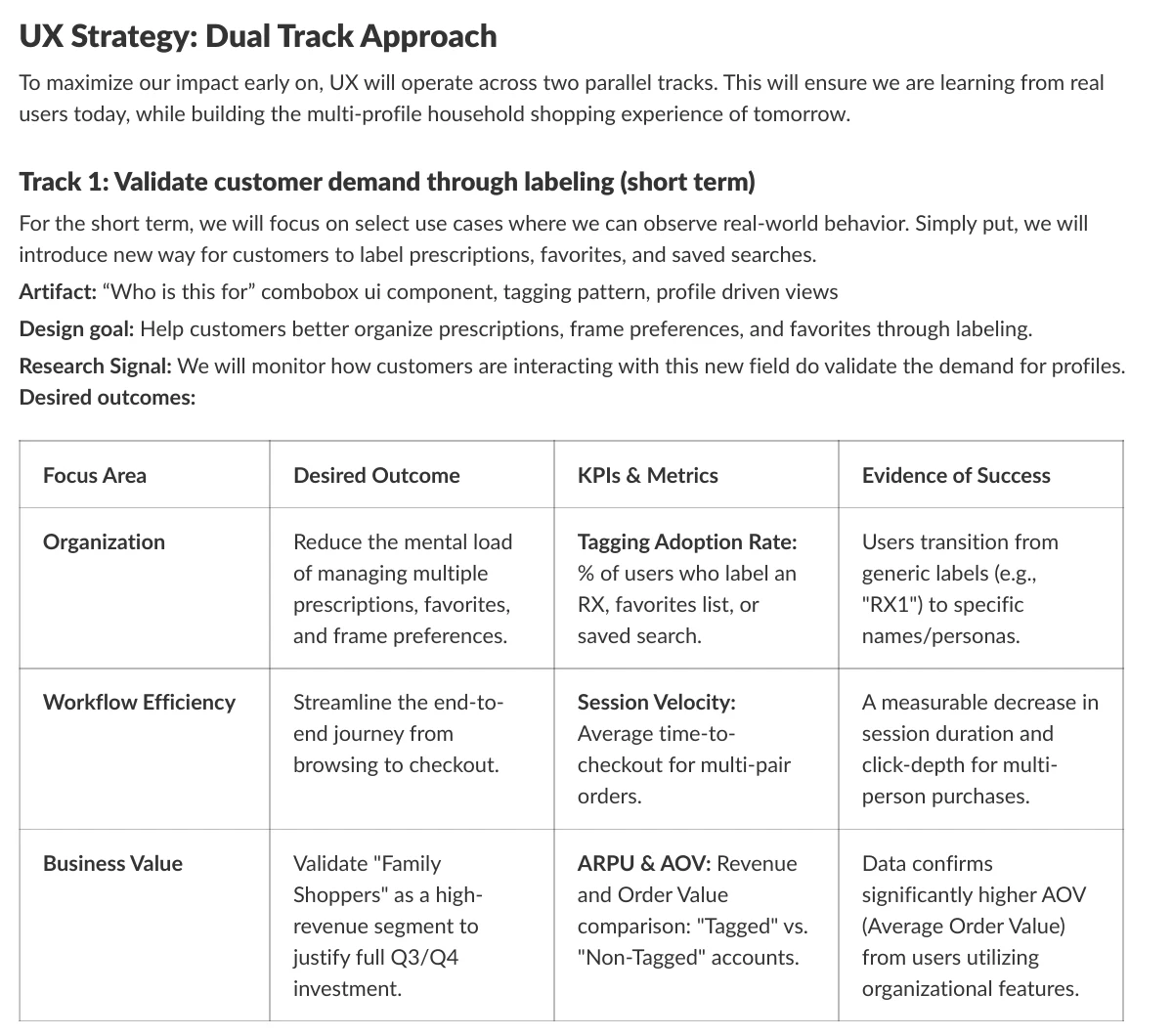
The same structure stretched to very different work. Order Tracking used it for a launch: the working doc, the design jam and its follow-up, the messaging framework and a recorded prototype walkthrough. Multi-Profile Shopping used it for an idea that was little more than a goal, and the doc turned it into a north star, working tenets, and two tracks of UX work with desired outcomes, metrics and the evidence of success we’d look for.
4.3 Prove it, then pilot it
Adoption was the hard part, not the template.
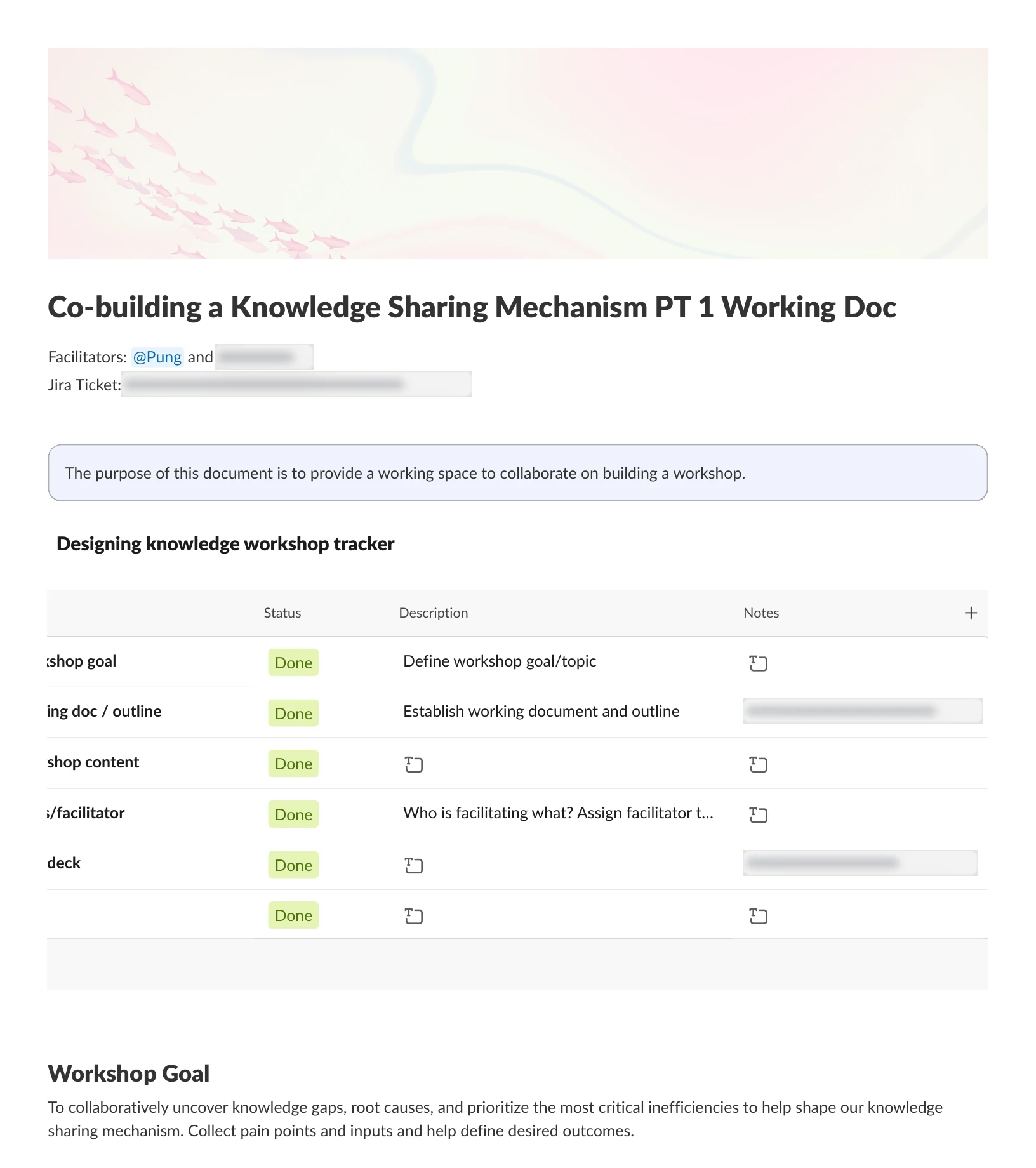
Before asking anyone else to change, I wanted to understand what the team actually struggled with. I co-facilitated a workshop with a UX colleague to co-build a knowledge sharing mechanism with the team, instead of handing one down. We introduced what a mechanism is, a tool plus adoption, inspection and iteration, then collected pain points, dug into the top ones with Five Whys, and sorted them into major time sinks and quick wins.
At the start of 2026 the team was reorganizing, and we needed a better way to manage everything. The tools I was already using on my own projects were a natural fit for the broader team. There was resistance. Designers were hesitant to add more work to their plates, and our UX PM was worried about what it would mean for Jira. I argued that Jira is a great developer tool once requirements are set, but we didn’t have a place to manage our own work.
So we started slow. The team had seen how it improved my own projects. I piloted it with my team, Web Experience, and after a month of adoption, we rolled it out to the greater team, with my manager helping with the initial push. All three teams adopted it: Growth, Web Experience and Design System.
4.4 Build team trackers on top of the docs
One view of all the work, still in Slack.
My manager didn’t have a way to see a bird’s-eye view of all her team’s work, so the working docs were a natural solution for her too. We built on top of the project documentation by creating team trackers that housed each project’s doc and its work. Because they lived in Slack, they were visible to anyone.
The trackers replaced the Monday morning top-priorities message, an automated prompt where each designer typed in what they were working on that week, with no links or further context. Instead of a weekly snapshot, anyone could open a tracker, follow a link to a project’s working doc, and see the decisions behind it. My manager thanked me for making it easier to see what everyone was working on.
Writing to bring people along
The same habit, on a bigger question.
The reorganization came from leadership wanting to replace squads with teams organized by delivery speed. I wrote a discussion starter for the UX team and D2C leaders on organizing designers by strategic domain instead. It said up front what it was, a discussion starter, and what it was not, a proposal to throw away our current structure. Peer reviewers added their thinking directly in the doc. Writing the argument out, in the open, is how I bring people along before asking them to agree.
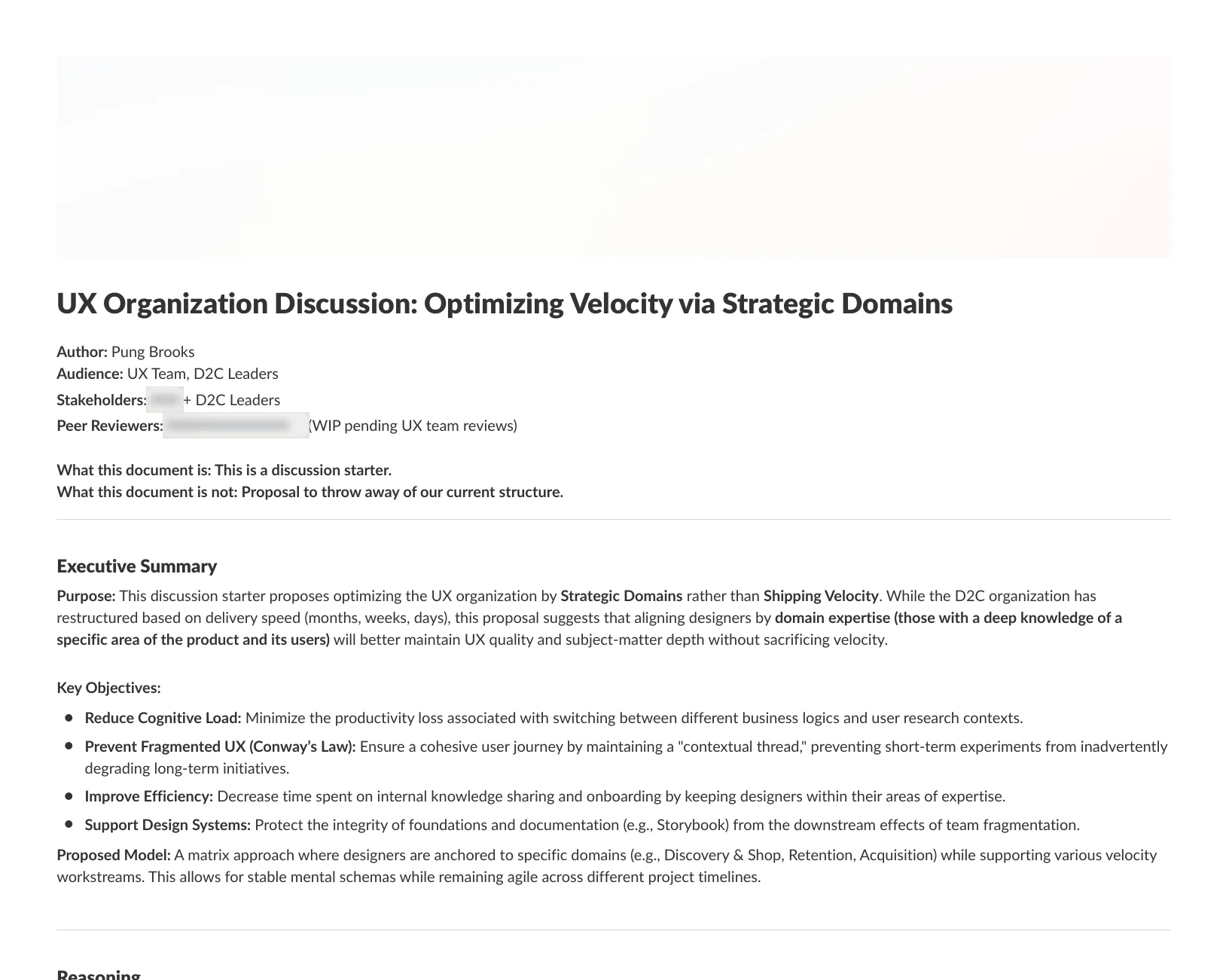
After I left, I learned the organization had reversed course and returned to domain-based squads. I can’t say how much the document influenced that, because I was gone by then, but it did get the conversation started.
05 / What it enabled
Visibility into our work, for the first time.
Soon the entire UX team was tracking its work in Slack, which gave everyone visibility into what we were doing and why. It started as a template for my own projects, and became a shared way of working across three teams. I left Zenni shortly after the rollout, so I didn’t get to see its longer-term effects.
Reflection
You don’t need authority to start changing how a team works, but you do need it to scale. I proved the practice on my own projects and with my team, partnering closely with our UX PM, who was new to the role and whose focus was mostly on how UX worked with other teams. My manager had watched me work this way since I joined, and pushed me to spread it. I hesitated, because without a mandate it looked like one designer’s preference. Looking back, I wish I had asked her for more support early on, to help the team adopt it. Once we made it a team objective, I was happy to lead the adoption.